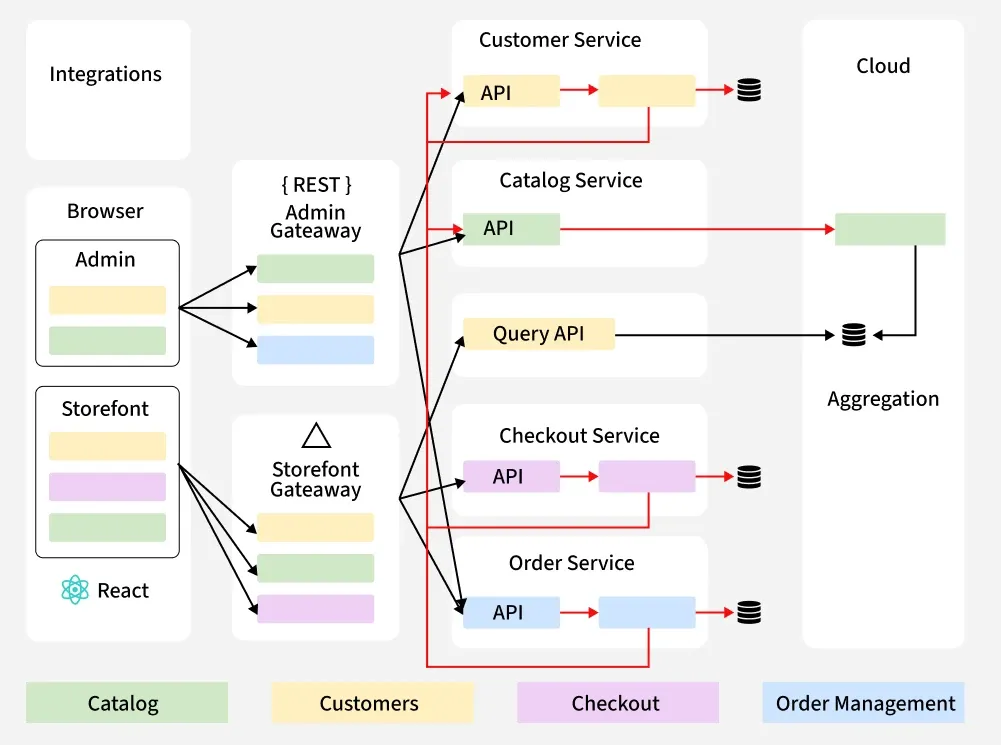
When you tap an app, search a site, or stream a show, the result appears to be instantaneous. That polish is the work of system design: the craft of deciding how pieces of software fit together so the whole behaves reliably, quickly, and predictably at whatever scale you need.
If you’re new and want to go deep, this guide expands the basics into a practical learning path. Read it as a map: the landmarks you should understand, the skills to practice, the projects that teach fastest, and the thinking habits that separate guesswork from sound engineering.
Quick recap: what system design really is
System design is the process of translating product and operational requirements into an architecture of components (databases, caches, APIs, queues, compute nodes, etc.) and their interactions. It answers two types of questions:
- Functional: What must the system do? (e.g., store user profiles, deliver timelines, process payments.)
- Non-functional: How well must it do it? (e.g., latency, throughput, availability, consistency, cost, security.)
Good system design makes trade-offs explicit, balances constraints, and gives you a roadmap to build systems that survive the real world.
Why go deep? (Why this is worth your time)
A shallow understanding gets simple apps running. Depth gives you the ability to:
- Predict and prevent failure modes before they happen.
- Make principled trade-offs instead of guessing.
- Choose the right tool for the job (not the hip one).
- Design systems that scale smoothly as users and features grow.
- Communicate designs clearly to peers and stakeholders.
In short: depth turns costly surprises into manageable engineering decisions.
High-Level Design: URL Shortener (Beginner-Friendly Explanation)
Imagine a URL shortener as a tiny post-office. You give it a long, messy address; it hands you a short, neat code. When someone uses that code, the system looks up the original address and sends them there.
The HLD focuses on how the system works end-to-end, without deep internals.
1. Core Flow (The Big Picture)
The system has two main motions:
A. Create a short URL
- User sends a long URL through an API or webpage.
- The system generates a short ID (like
abc123). - It stores the mapping:
abc123 → https://very-long-url.com/... - Returns the short URL:
https://short.ly/abc123.
B. Redirect a short URL
- User opens
https://short.ly/abc123. - System looks up the code.
- Finds the original long URL.
- Redirects the user.
That’s the entire heartbeat.
2. Major Components (At a glance)
Think of them like rooms in a house:
1. API Gateway / Load Balancer
Handles incoming traffic and distributes it across servers.
2. Application Servers
Where the logic sits: generating IDs, storing data, performing redirects.
3. Database
Stores:
• short ID
• long URL
• creation time
• expiration time
A simple key-value style data model.
4. Cache (e.g., Redis)
A fast memory store used to speed up redirects.
Most redirect traffic never even touches the database.
5. ID Generator
Responsible for producing unique short codes.
Can be:
• counter + Base62
• random strings
• hash trimmed to a few characters
6. Analytics/Background Jobs (Optional for beginners)
Count clicks, track stats, clean expired URLs.
3. High-Level Architecture Diagram (Text Form)
          ┌────────────────────────┐
          │     Client/User        │
          └──────────┬─────────────┘
                     │
                     ▼
          ┌────────────────────────┐
          │  Load Balancer / API   │
          └──────────┬─────────────┘
                     │
        ┌────────────┴─────────────┐
        │      App Servers         │
        └────────────┬─────────────┘
                     │
       ┌──────────────┼─────────────────┐
       │               │                 │
       ▼               ▼                 ▼
┌───────────┐   ┌────────────┐   ┌─────────────────┐
│   Cache   │   │  Database  │   │ ID Generator     │
│ (Redis)   │   │ (KV Store) │   │ (Counter/Random) │
└───────────┘   └────────────┘   └─────────────────┘
                     │
                     ▼
           ┌─────────────────────────┐
           │ Background Workers      │
           │ (cleanup, analytics)    │
           └─────────────────────────┘
This is the picture a beginner should walk away with.
4. How the System Behaves at Scale
You plant the seeds now so the system doesn’t panic later.
• Redirects are read-heavy, so caching becomes the star of the show.
• Use read replicas or NoSQL if the database starts sweating.
• Application servers can scale horizontally.
• ID generation must stay unique even with many servers—this is the bottleneck to anticipate.
5. Non-Functional Thinking (Painter’s brushstrokes)
The system must be:
• Fast — majority of redirects should hit the cache.
• Highly available — multi-node system avoids downtime.
• Durable — because losing a mapping breaks user links.
• Horizontally scalable — traffic spikes shouldn’t hurt.
for reference, please check the link
Top concepts you should master (short checklist)
These are the recurring ideas you’ll see in almost every design problem:
Caching & cache invalidation
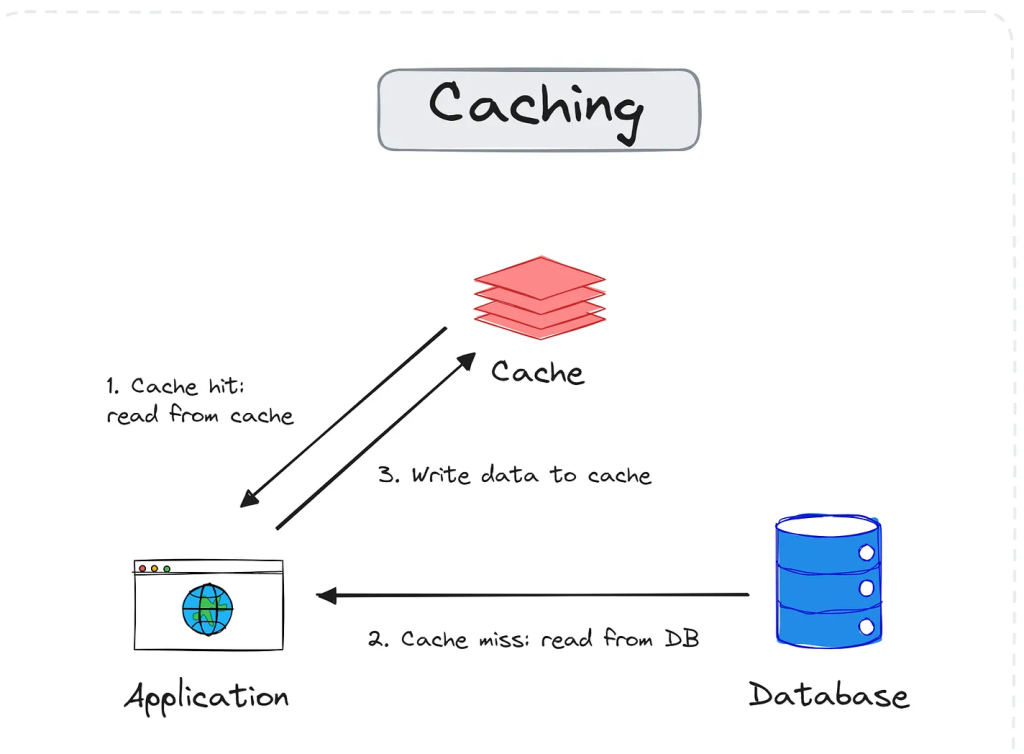
What It Is
- Caching stores recently-used or expensive-to-compute data so future requests are served faster.
- It reduces load on databases, cuts response time, and improves user experience dramatically.
- Think of it as keeping your most-used tools on the workbench instead of the basement.
Why We Use It
- Avoid repeated expensive database queries.
- Reduce latency for hot data (user profile, product details, recommendations).
- Handle traffic spikes without scaling the database.
- Improve app resilience—if the DB is slow, cache still responds quickly.
Load balancing algorithms
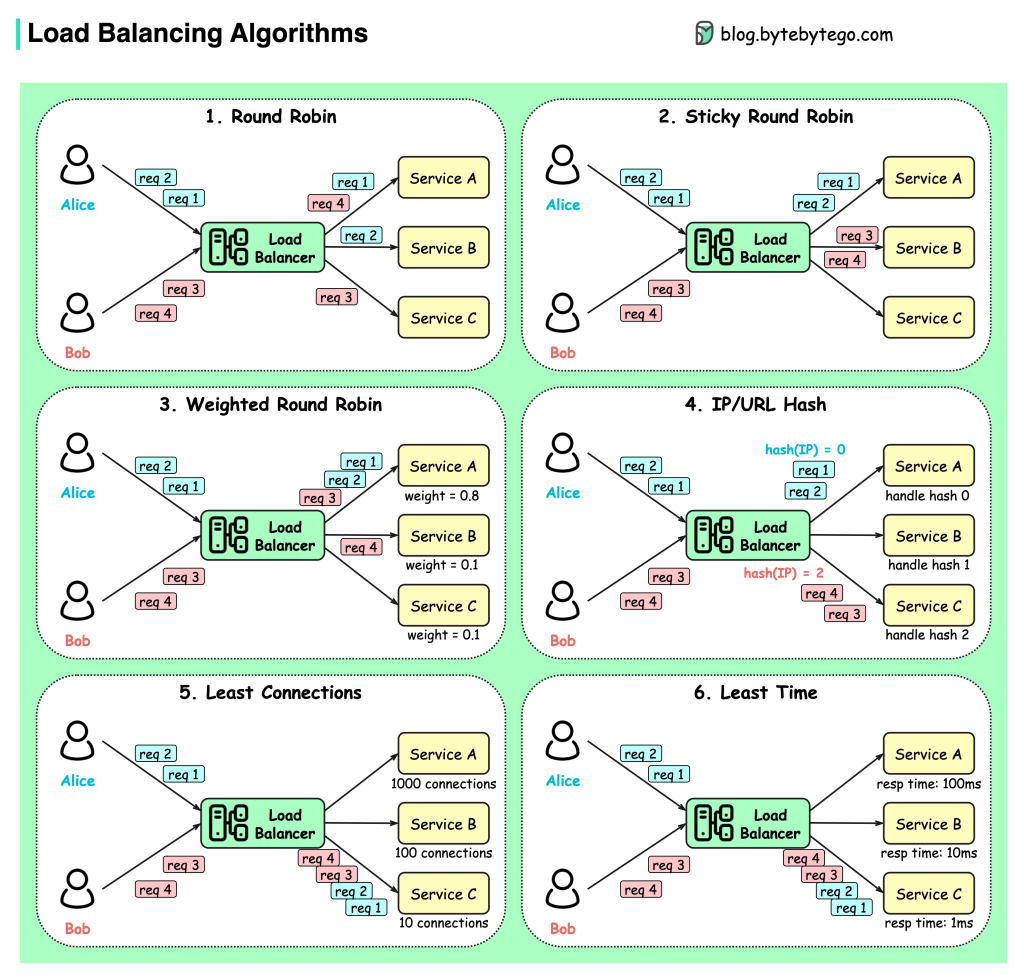
What It Is
- A load balancer sits in front of multiple servers and distributes incoming requests.
- It prevents any single server from getting overloaded, ensuring smooth performance.
- Think of it as a highway toll booth directing cars to the shortest line.
- Without it, one server becomes a hotspot while others idle silently.
Why It Exists
- Improves overall system throughput.
- Reduces latency by avoiding overloaded nodes.
- Enables horizontal scaling.
- Helps with fault tolerance—if one server dies, traffic shifts automatically.
- Creates a transparent “single entry point” for clients.
Database indexing & query optimization
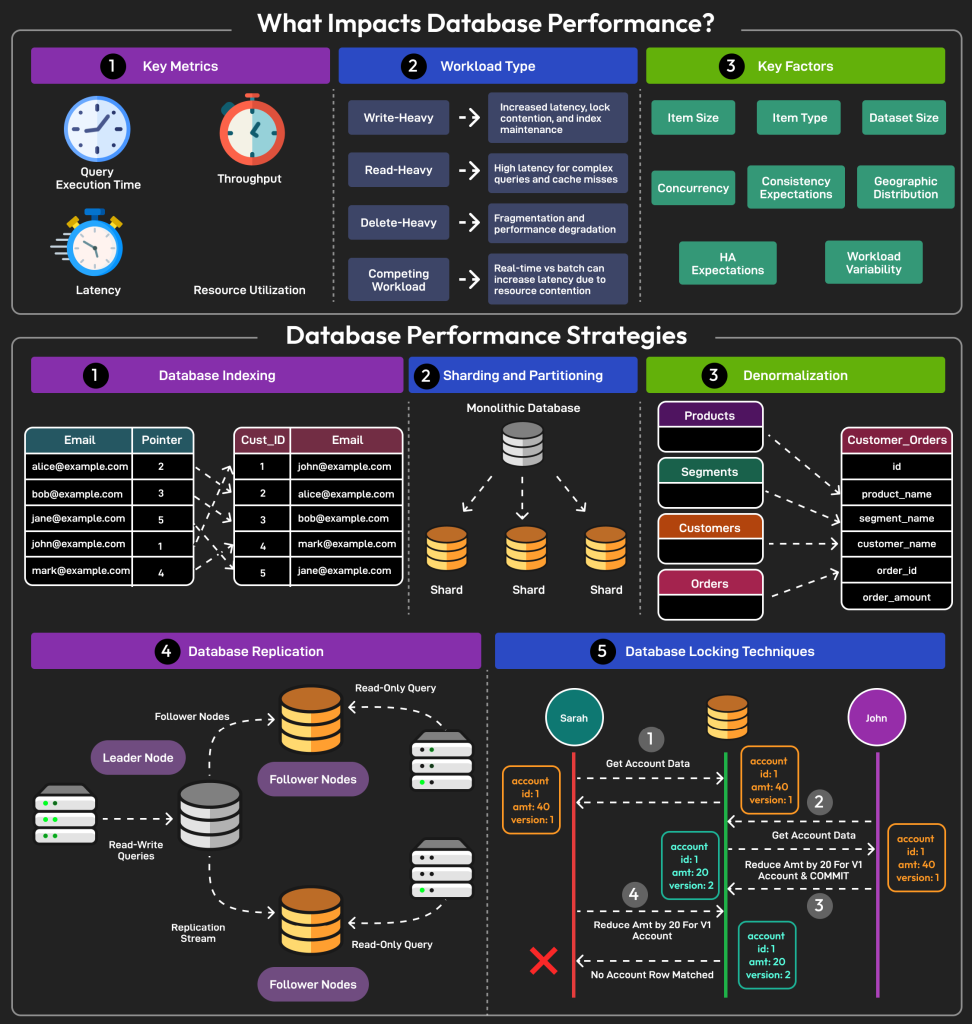
What It Is
- Indexing is a technique that helps the database quickly locate rows without scanning the entire table.
- It works like the index at the back of a book—jump straight to the page instead of reading every page.
- Query optimization ensures the database uses the best possible path (query plan) to execute your SQL.
Together, indexes + optimization turn slow queries into lightning-fast lookups.
Why It Matters
- Reduces query response time by orders of magnitude.
- Lowers CPU and disk load on the database.
- Helps systems scale before resorting to sharding or caching.
- Prevents slow queries from taking down the DB under high load.
Indexes are one of the cheapest, most powerful performance improvements available.
Rate limiting and backpressure
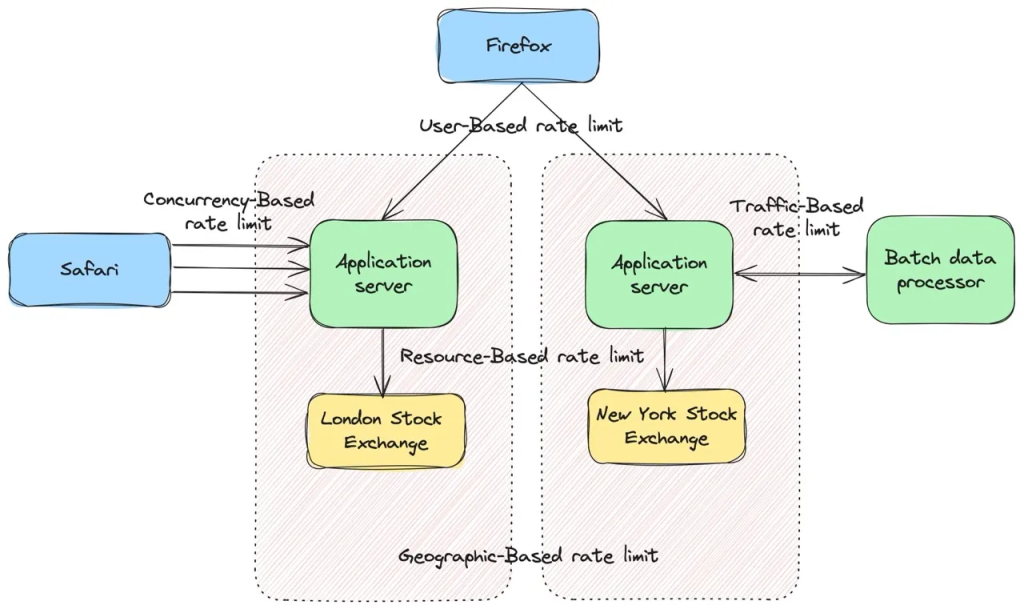
Distributed systems behave a bit like water networks. If too much water flows into a pipe that’s too small, the system doesn’t politely say “slow down”—it bursts. Rate limiting and backpressure are the valves that stop your services from drowning under sudden spikes of traffic.
What it is
Rate limiting controls how much traffic a client or service is allowed to send within a certain time window.
Backpressure controls how fast downstream systems can accept more work. When a consumer falls behind, it signals upstream producers to slow down—or buffer less.
These two ideas keep systems healthy under load, even when clients go wild.
Why it matters
Without proper limiting:
- APIs collapse under spikes
- Queues overflow
- Databases melt
- Message brokers backlog
- Latency increases for everyone
- Cascading failures ripple across microservices
Rate limiting is the gatekeeper.
Backpressure is the “slow down, I’m full” signal.
Together they create resilience in unpredictable traffic environments.
Rate Limiting
Goals
- Protect resources
- Prevent abuse
- Ensure fairness across clients
- Keep system latency predictable
- Avoid cascading failures
Common Rate Limiting Algorithms
- Fixed Window
- Sliding Window
- Token Bucket
- Leaky Bucket
Backpressure
What it does
Backpressure communicates “I’m slow; stop pushing” upstream.
It prevents producers from flooding consumers.
Where it shows up
- Message queues
- Kafka / Event Hubs partitions
- Reactive programming (Rx, Reactor, Akka)
- Stream processors
- TCP flow control
- Async microservices
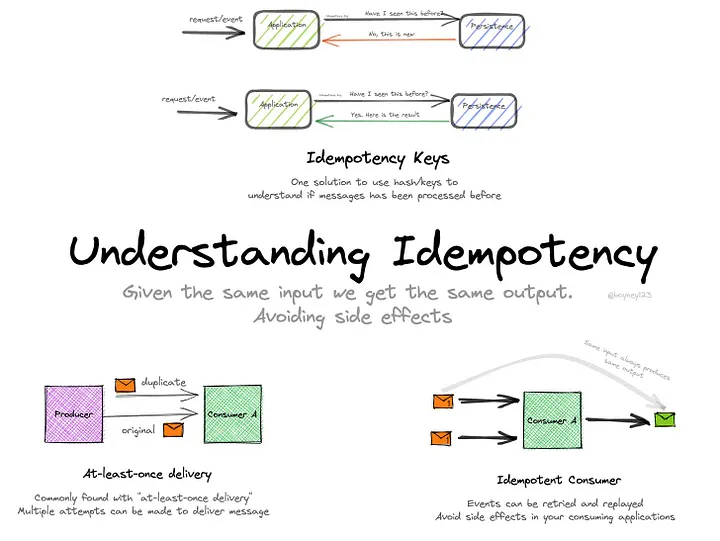
Idempotency and safe retries
What it is
Eventual consistency describes systems where data doesn’t become consistent instantly across all nodes—but will become consistent after some time, as replicas sync up.
It’s the backbone of high-availability distributed databases like DynamoDB, Cassandra, Cosmos DB, and many CRDT-based systems.
Think of it as:
“Writes are fast, reads might be slightly stale, but the world catches up.”
Why it exists
You can’t have perfect availability and perfect consistency at the same time in a distributed system.
So when a network partition happens, eventual consistency chooses availability by allowing writes on multiple replicas independently.
That independence creates conflicts. Conflicts must be resolved.
Where inconsistencies come from
- Concurrent writes on different replicas
- Network partitions delaying replication
- Clocks drifting between nodes
- Replays / retries causing out-of-order updates
- Cross-region latency causing divergent data states
Where it’s used
- Global multi-region databases (DynamoDB, Cosmos DB, Cassandra)
- Messaging systems (Kafka, Event Hubs)
- Real-time collaboration apps
- Offline-first mobile apps (WhatsApp messages, Notes apps)
- Event-driven microservices
How developers should think about it
- Don’t assume every read is fresh.
- Design writes to be idempotent.
- Expect out-of-order messages.
- Plan for offline updates and merging.
Observability: logs, metrics, distributed tracing
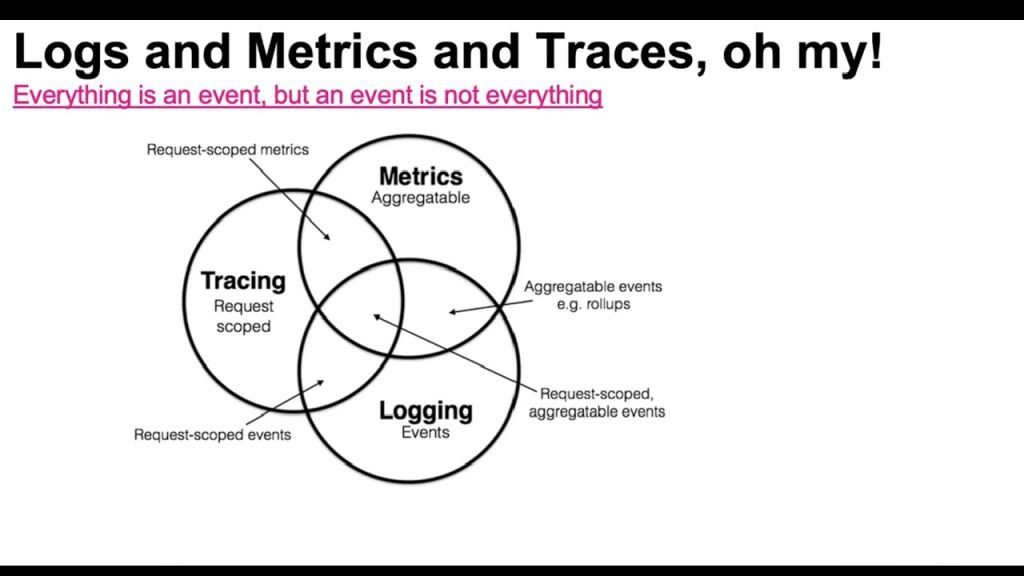
Logs tell stories. Metrics tell trends. Tracing tells journeys.
Together, they help you see inside a black box.
A high-scale system is unreadable without these three pillars:
– Logs for “What happened?”
– Metrics for “Is the system healthy?”
– Tracing for “How did a single request travel through microservices?”
This is how engineers debug a constellation instead of a single star.
CAP theorem and practical implications
What it is
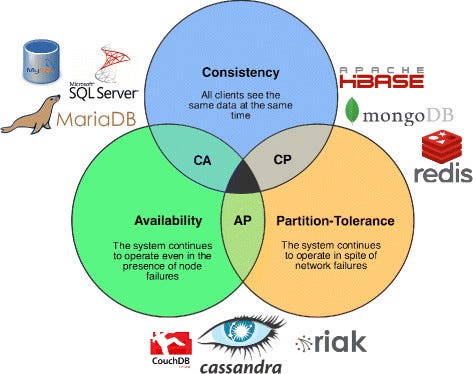
CAP theorem says that in a distributed system, you can only guarantee two of these three properties at the same time:
- Consistency — every read returns the latest write
- Availability — every request gets a response
- Partition Tolerance — the system keeps working even if the network splits
Network partitions are unavoidable, so real-world systems always pick between Consistency or Availability when the network misbehaves.
CAP isn’t about normal times—it’s a rule for failure moments.
The Three Properties in Plain Words
Consistency (C)
All nodes show the same data at the same moment.
If someone updates a record, every reader sees that update instantly.
Availability (A)
Every request gets a response, even during failures.
Might be stale data, but you won’t get an error.
Partition Tolerance (P)
The system continues to operate despite network failures between nodes.
In distributed systems, this is unavoidable—nodes live far apart, and the network always acts like a mischievous ghost.
The Three System Modes
1. CP systems (Consistency + Partition Tolerance)
When a partition occurs, these systems prefer correctness over uptime.
They refuse writes (or sometimes reads) to avoid serving stale data.
Examples:
- ZooKeeper
- etcd
- MongoDB in “majority write concern”
- NewSQL DBs like Spanner (though Spanner uses fancy clocks to cheat past some CAP pain)
Used for:
leader election, configuration stores, metadata, transactions, distributed locking.
2. AP systems (Availability + Partition Tolerance)
When a partition occurs, they allow operations to continue—possibly returning outdated data.
They heal later using eventual consistency.
Examples:
- DynamoDB
- Cassandra
- Redis Cluster (in certain configs)
- Couchbase
- Kafka brokers during leader failover
Used for:
high-throughput, globally distributed, latency-sensitive systems.
3. CA (Consistency + Availability)
This is only possible if the system is not distributed or doesn’t need partition tolerance.
Once you distribute across the network, CA becomes a myth.
Examples:
- Single-node SQL databases
- Any system running entirely on one machine
Useful for:
local development, simple monoliths, small-scale apps.
Queues vs streams vs pub/sub
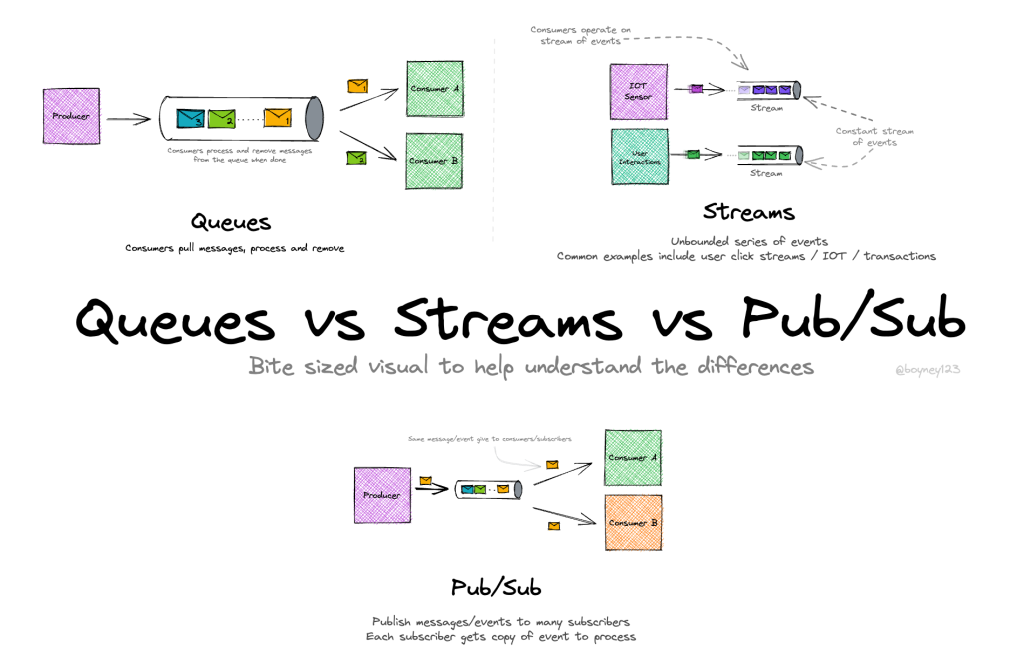
What it is
These are the three major messaging patterns used in distributed systems.
They sound similar, but they behave very differently—especially when you scale or when multiple consumers enter the picture.
Think of them as three different ways to move time-ordered data around a system.
Message Queue
What it is
A queue delivers messages point-to-point.
One consumer reads a message, and it disappears from the queue.
Like a ticket counter handing out tokens: each token is used once.
Core characteristics
- Work distribution → multiple consumers share the load.
- At-least-once delivery is typical (due to retries).
- Messages are removed after consumption.
- Ordering is not guaranteed once multiple consumers join.
Used for
- Background jobs
- Email sending
- Image processing
- Payment confirmation tasks
- Inventory updates
Examples
- Azure Service Bus
- RabbitMQ
- AWS SQS
- Google Pub/Sub (queue mode)
Mental model
A task pipe: workers stand in a line and pull jobs.
Streams
What it is
A stream is an append-only log where messages are kept for a configurable time or size window.
Consumers do NOT remove messages—each consumer reads at its own pace using offsets.
Core characteristics
- Replayable history → read old data anytime.
- Multiple consumer groups read independently.
- Strong ordering per partition.
- High throughput and ideal for event-driven systems.
Used for
- Event sourcing
- Analytics pipelines
- Clickstream data
- Payments ledger
- Audit logs
- Distributed event-history storage
Examples
- Kafka
- Azure Event Hubs
- Redpanda
- Pulsar
- Kinesis
Mental model
A never-ending journal where everyone bookmarks their place.
Pub/Sub (Publish–Subscribe)
What it is
Publishers broadcast messages to subscribers.
All subscribers receive the message in real time, but the system may not store it permanently.
Two types
- Ephemeral Pub/Sub (no storage):
Redis Pub/Sub, MQTT- If you’re offline, you miss the message.
- Durable Pub/Sub (stored):
Google Pub/Sub, Kafka (in topic mode), Service Bus Topics- Subscribers can catch up later.
Core characteristics
- One message → many subscribers.
- Loose coupling between producers and consumers.
- Ideal for fan-out patterns.
Used for
- Sending notifications
- Real-time updates
- Broadcasting cache invalidation
- Reactive UI updates
- Integrating multiple microservices
Examples
- Redis Pub/Sub
- Google Pub/Sub
- Kafka topics
- AWS SNS
Mental model
A radio broadcast: everyone listening gets the same signal.
If your radio is off, you miss it (unless the system is durable).
How they differ (quick intuition)
Queue
One worker processes each job.
Jobs disappear after processing.
Good for background tasks.
Stream
Everyone can read everything.
Messages stay for days/months.
Good for analytics + event sourcing.
Pub/Sub
Broadcast channel for real-time signals.
Good for notifications + fan-out.
Which one should you choose?
Choose a Queue when:
You have tasks that must be processed by workers one at a time.
Choose a Stream when:
You care about order, history, replays, analytics, or event logs.
Choose Pub/Sub when:
You want to broadcast events to multiple services in real time.
Horizontal vs vertical scaling and autoscaling triggers
What it is
Scaling is how a system grows when demand increases.
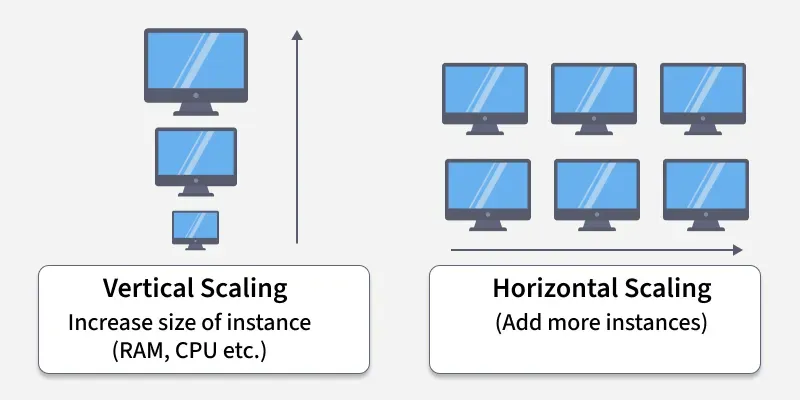
There are two classic strategies: vertical and horizontal.
Both work, both have costs, and both have failure modes you must understand before designing a large-scale system.
Vertical Scaling (Scale Up)
What it is
Increasing the power of a single machine:
More CPU → faster processing
More RAM → larger datasets in memory
More SSD → faster I/O
It’s like upgrading your laptop from 8 GB RAM to 64 GB.
Strengths
- Simple to start
- No code or architecture changes
- Easy to operate
- Great for early-stage MVPs
Weaknesses
- Hard upper limit → you eventually hit “the biggest machine available”
- Failures are impactful because everything is on one box
- Expensive at high end (large VMs have steep pricing curves)
- Doesn’t improve availability; it just makes one node faster
Used for
- Small apps
- Databases needing high RAM
- Traditional monoliths
- Low traffic workloads
Horizontal Scaling (Scale Out)
What it is
Adding more machines to share the load.
Instead of one big server, you run dozens or hundreds of smaller ones.
It’s like adding more people to a support team instead of forcing one person to answer every call.
Strengths
- Practically infinite scale (add more nodes)
- Better availability (no single point of failure)
- Cheaper per unit compared to mega-sized machines
- Easier parallelism for stateless services
Weaknesses
- Requires distributed system design
- Harder data consistency
- Requires load balancing
- More operational complexity
Used for
- Microservices
- Web servers
- Real-time APIs
- Streaming systems
- Global-scale apps
Where Horizontal Scaling Gets Tricky
When you distribute work across many nodes, you must solve problems like:
- Consistent hashing
- Distributed locking
- Leader election
- Partitioning (sharding)
- Eventual consistency guarantees
- Cache coherence
Horizontal scaling gives power, but forces you into distributed systems land.
Autoscaling (Letting the System Scale Itself)
What it is
Autoscaling automatically adjusts the number or size of instances based on real-time usage:
Scale out when busy → scale in when quiet.
This is what keeps your app fast during peak load and cost-efficient during low traffic.
Where it runs
- Kubernetes (HPA, VPA)
- Azure App Service autoscaling
- AWS EC2 Auto Scaling Groups
- GCP Managed Instance Groups
- Serverless scaling (Functions, Lambda)
Hands-on projects that teach fastest
Apply concepts by building small systems that reproduce real problems:
URL Shortener
- muKaustav/ShortURL (GitHub): MERN + Redis + MongoDB + Docker + load-balancer + caching
GitHub link- Learn ID generation, storage, redirects, horizontal scaling, fault tolerance
- Upstash URL Shortener Tutorial: Python + Redis minimal example
Upstash link- Focus on data modeling and cache expiration/invalidation
- Reintech Go + Redis Tutorial: Minimal URL shortener in Go
Reintech link
Chat System
- redis-io Chat App Tutorial: Real-time chat with Redis + WebSockets/Socket.IO
Redis.io link- Learn pub/sub, message persistence, and real-time flow
- Can extend with rooms, load balancing, and concurrent connections
Rate Limiter
- freeCodeCamp Tutorial: Distributed rate limiting with Redis + token bucket
FreeCodeCamp link- Learn token-bucket algorithms, atomic operations, and distributed setup
- hooiv/redis-rate-limiter (GitHub): Advanced Redis-based rate limiter
GitHub link- Focus on consistency, concurrency, and real-world constraints
For each project: sketch HLD, implement a minimal prototype, then force failure modes (network partitions, node restarts, high load) and improve.
How to practice design interviews (if that’s your goal)
- Start by clarifying requirements and constraints (QPS, latency, storage, budget).
- Do a quick capacity estimate. Even rough numbers guide design choices.
- Sketch a high-level architecture, then zoom into data/modeling or the hot path.
- Discuss failure scenarios and how the system behaves under them.
- End with trade-offs and open questions (what you’d monitor, what you’d improve next).
Practice with peer reviews and time-boxed mocks. Explaining your choices clearly is as important as the choices themselves.
Common beginner mistakes (and how to avoid them)
- Choosing the newest tech first: pick a reliable tool that fits requirements, then optimize.
- Optimizing prematurely: measure before you refactor.
- Ignoring operational costs: factor run costs and complexity into decisions.
- Neglecting monitoring until later: observability should be part of every design.
- Assuming single-node correctness scales: distributed systems add new failure classes—test them.
Recommended reading & resources (a compact starter list)
Start with one or two well-written, foundational books and supplement with hands-on docs and blog posts. (You already have a great excerpt above—use it.)
- System Design was HARD until I Learned these 30 Concepts
- What Is System Design | System Design | AlgoMaster.io
- How to build a URL Shortener with Redis and Python — a simple URL‑shortener tutorial: https://upstash.com/docs/redis/tutorials/python_url_shortener Upstash: Serverless Data Platform
- How to Build a Scalable URL Shortener with Distributed Caching using Redis + Node.js — more advanced version emphasizing caching, sharding, and scalability: https://www.freecodecamp.org/news/build-a-scalable-url-shortener-with-distributed-caching-using-redis/ FreeCodeCamp
- How to build a distributed Rate Limiting System using Redis and Lua (Node.js version) — great for learning rate limiter design: https://www.freecodecamp.org/news/build-rate-limiting-system-using-redis-and-lua/ FreeCodeCamp
- How to build a Rate Limiter with Redis and Python — alternate guide for Python developers: https://www.freecodecamp.org/news/build-a-rate-limiter-with-redis-and-python-to-scale-your-apps/ FreeCodeCamp
- How to build a Chat application using Redis + WebSockets (Flask + Socket.IO) — real‑time chat tutorial: https://redis.io/learn/howtos/chatapp Redis
- Basic Redis Chat App Demo (Node.js + Socket.IO) — sample project on GitHub to see pub/sub + real-time chat in action: https://github.com/redis-developer/basic-redis-chat-app-demo-nodejs GitHub
- Using Redis Pub/Sub with Node.js (blog & explanation) — helpful article to understand pub/sub messaging pattern in Node.js context: https://blog.logrocket.com/using-redis-pub-sub-node-js/ LogRocket Blog
(If you want, I can produce a curated reading list and links tailored to your background and time availability.)
Closing thoughts
System design is a blend of engineering, architecture, and clear thinking. The best way to learn is to build deliberately: pick a focused project, design for real constraints, measure, and iterate. Over time you’ll develop the intuition to pick the right abstractions, balance trade-offs, and explain your choices with confidence.